Automating manual video editing for training content at scale
A slow "one video, one editor" process in Premiere Pro became an automatic pipeline that cleans, reframes, and edits recorded video lessons in minutes, built to handle hundreds of videos.
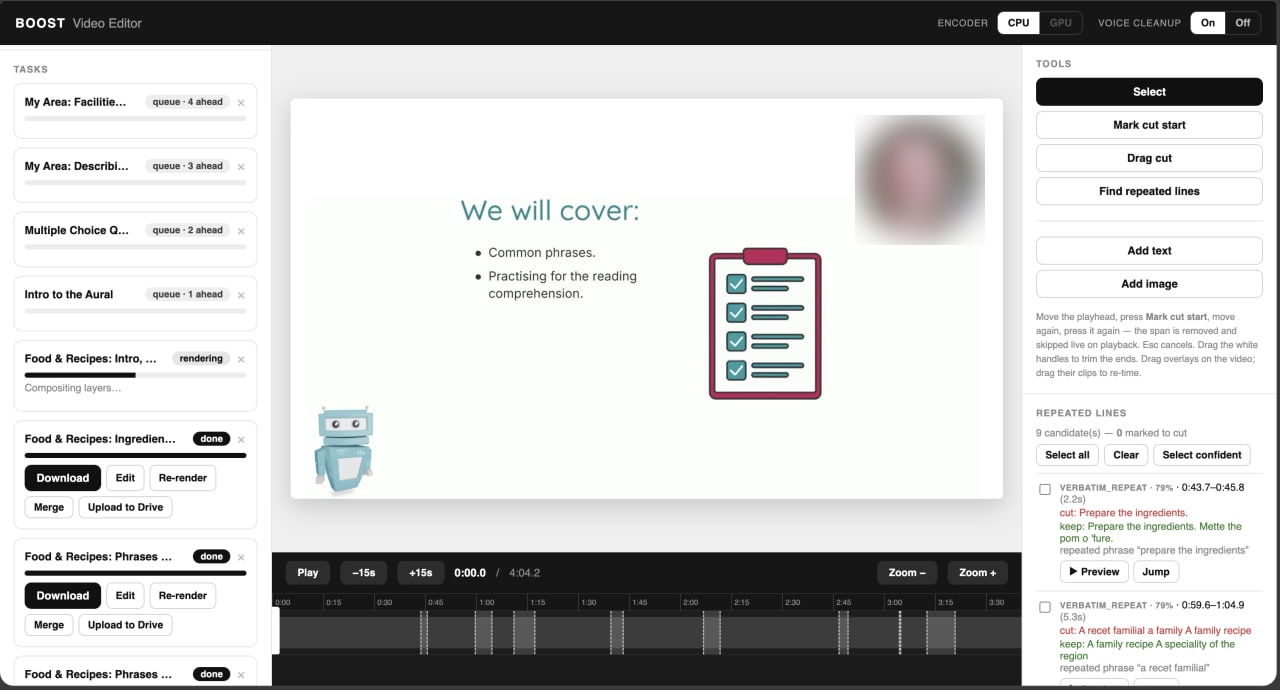
The editor the agency works in: render queue, cutting, repeat detection, upload to Drive
The problem
Black Camel Productions produces a large volume of recorded video lessons for an education-content client. These are screen and webcam recordings where the instructor talks through slides. Every video went through the same repetitive manual edit in Premiere Pro:
- Cropping out recording toolbars and extra interface elements
- Scaling and reframing the screen content
- Enlarging and repositioning the presenter's webcam bubble
- Masking gray page breaks and margins
- Exporting to a fixed broadcast spec
On top of that, the editor had to listen to every video to remove pauses, filler words, coughs, and repeated or botched phrases, the longest part of the job.
The problem wasn't quality, it was throughput. Each video took the editor about an hour of manual work, the process didn't scale, and quality varied between editors. At volume, manual content cleanup was the bottleneck.
The solution
We built an automated video production pipeline that reproduces the manual editing standard in code, plus an AI content-cleanup layer that the manual process couldn't do efficiently.
It runs as a managed service: Black Camel sends raw recordings, the pipeline processes them, and a finished video in brand style comes back, ready for their team's final assembly.
1. Pixel-accurate brand reproduction
We reconstructed the client's exact editing standard from their original Premiere presets and reference videos, so the output matches the spec to the pixel. Webcam framing, margins, and scale are measured and locked in (for example, the 42px webcam margin was checked against the reference video, not eyeballed).
2. Automatic visual cleanup
Removing toolbars and interface, masking page breaks, reframing the screen, and enlarging the presenter bubble all happen automatically, with no manual masking or keyframes.
3. Content-aware adaptive framing
The system analyzes each slide and adjusts automatically so images and tables on screen are never cropped or covered by the presenter overlay. This resolves real client complaints without hand-fixing every video.
4. AI content cleanup
- Removing silence and dead air through voice activity detection
- Removing filler words, coughs, and breaths with speech AI, with safeguards that protect real speech from being cut
- Detecting repeated phrases and flubs through AI transcription plus a text-analysis layer. It finds where the presenter repeated themselves and proposes an exact word-level cut, leaving the final decision to a human
Technical details
Reference-based accuracy
The brand geometry was decoded from the client's own design assets and checked against the reference video rather than estimated, so the output matches the spec every time and differences between editors disappear.
Deterministic repeat detection
To find repeated phrases, the pipeline combines Whisper transcription (with word-level timestamps) and a purpose-tuned text-matching layer. It pinpoints duplicated speech and proposes a clean cut, and a human approves the final result.
Optimized rendering
We tuned the render engine for Apple Silicon with smart frame reuse, roughly halving render time: from ~6 minutes to ~3 minutes for a typical 15-minute lesson.
Resilience at volume
Batch processing with automatic retries on network failures, saved results, and visible warnings, so nothing fails silently on a large batch.
Results and impact
- From ~1 hour of manual editing per video to ~3 minutes of automatic processing, freeing editors from routine work
- Consistent brand-style output: webcam, layout, and framing match the client's reference standard, with no differences between editors
- The heaviest manual task, listening for silence, filler words, and repeats, is now an automatic first pass with human approval, not work from scratch
Outcome
Black Camel moved from a labor-intensive "one editor, one video" process to a scalable production line: send recordings in batches, the pipeline does the heavy repetitive work, and human judgment is applied only where it adds value.
The result is lower cost per video, faster turnaround, and consistent brand quality at volume, which turns video production from a bottleneck into a throughput advantage.
Built for Black Camel Productions; the end education client remains anonymous by agreement.
Tech stack
| Language | Python |
| Video processing | FFmpeg · OpenCV |
| API / Orchestration | FastAPI |
| Transcription | Whisper (word-level timestamps) |
| Speech cleanup | Cleanvoice |
| LLM / Text analysis | Gemini |
| Optimization | Apple Silicon rendering |